sed (stream editor) to colorise script output
2 minutes read | 391 words by Ruben BerenguelYes, you can! Adding colors to terminal output is possible. You already know it, from ls –color In this post I show you a script that does it, in a simple way. I don’t have a full range of colors implemented, but you can find all here.
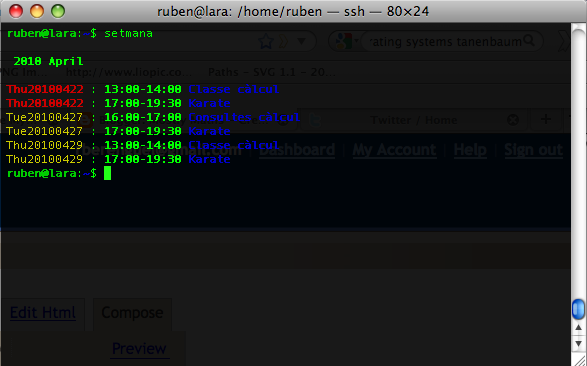
This is the sed-processed output given by Gcal. The original source looks like
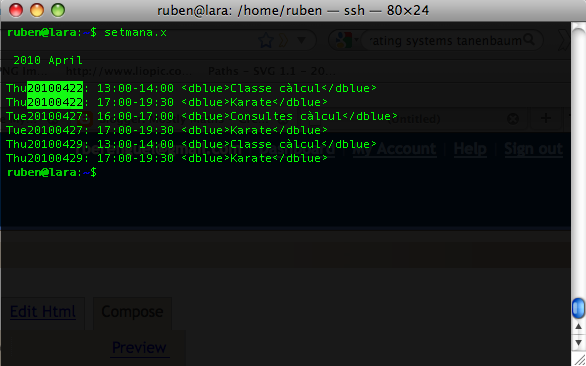
As you can see, I used as identifiers XML-like expressions. At first I just used odd punctuation marks (@, &, %…), but I realised it was too hard to remember. The script:
#\bin\bash
TEMP=calendartemp
TEMP2=calendartemp2
cat > $TEMP
#Change for dark blue
sed -e ’s/.*<\/dblue>/\33 [1;34m& [0m/' -e ’s/<\/dblue>//g' -e ’s///g' $TEMP > $TEMP2
#Change for blue
sed -e ’s/.*<\/blue>/\33 [34m& [0m/' -e ’s/<\/blue>//g' -e ’s///g' $TEMP2 > $TEMP
#Change for dark green
sed -e ’s/.*<\/dgreen>/\33 [32m& [0m/' -e ’s/<\/dgreen>//g' -e ’s///g' $TEMP > $TEMP2
#Change for green
sed -e ’s/.*<\/green>/\33 [1;32m& [0m/' -e ’s/<\/green>//g' -e ’s///g' $TEMP2 > $TEMP
#Change for red
sed -e ’s/.*<\/red>/ \33[1;31m& [0m/' -e ’s/<\/red>//g' -e ’s///g' $TEMP > $TEMP2
#Change for dark red
sed -e ’s/.*<\/dred>/ \33[31m& [0m/' -e ’s/<\/red>//g' -e ’s///g' $TEMP2 > $TEMP
cat $TEMP > $TEMP2
sed -e ’s/[0-9][0-9]:[0-9][0-9]./\33 [1m& [0m/g' $TEMP2 > $TEMP #White bold for hours
sed -r -e ’s/[A-Z][a-z][a-z][0-9]{8,8}/ \33[33m& [0m/' $TEMP > $TEMP2 #Dark yellow for date
#Turn today’s date into red bold
sed -e ’s/.*<.*>/\33[1;31m& [0m/' -e ’s// /g' $TEMP2 > $TEMP
sed -e ’s/ [0-9][0-9][0-9][0-9].*$/\33[1m& [0m/' $TEMP #White bold for header
rm $TEMP
rm $TEMP2
You may wonder what \33 is: it is an escape character. They are the ones that tell the terminal to output color. In emacs it appears as ^[ (but only as one character, not two!). To write them (sorry, I didn’t find an easier method), open a terminal, write echo " then press Control-V followed by esc, then " > escape.txt and you’ll have the escape character in escape.txt. You can open this file and copy-paste it where needed.
The script is used just as a pipe:
setmana.x | Colorise.sh
where setmana.x calls gcal as I showed in my previous Gcal post. Now I only use it in the Gcal output, but I will probably use it somewhere else.
Related posts:
 Three dee (3-dimensional file system browsers review)
Power to the command line
Gcal: the ultra-powerful command line GNU calendar
ParseList(ScrambleList(Relateds(Linux)),10)